7 Essential Crypto Trading Tools Every Trader Should Know
Most tool round-ups are a list of logos. This one is organised by the job each tool actually does, what it costs, and where the free tier stops being enough. Including the one category that quietly changes your returns more than any indicator ever will.

- Seven categories cover almost everything a trader needs: charting, market data, portfolio tracking, on-chain analytics, automation, tax, and cost control.
- The free tiers are better than most people assume. TradingView, CoinGecko and CoinMarketCap cover the majority of retail needs without a subscription.
- On-chain analytics is the category where free stops early. Glassnode and Nansen gate the metrics that actually differ from what price already tells you.
- Trading bots are not a strategy. They execute one, and a bot running a strategy with no edge simply loses money faster and more consistently.
- Tax software is the tool people regret skipping. Reconstructing two years of trades across four exchanges by hand is a weekend nobody gets back.
- The seventh category is the one no round-up lists: what you pay to trade. For an active trader it dwarfs every subscription in this article combined.
Search for crypto trading tools and you get the same twelve logos in a different order, with no sense of which ones you actually need or when the free version runs out. The useful question is not which tools exist. It is which job you are trying to do, and what the cheapest honest way to do it is.
What a tool can and cannot do for you
A tool does not give you an edge. It removes friction from the edge you already have, or shows you that you do not have one. That distinction saves a lot of money, because most people buy the expensive subscription first and look for a strategy afterwards.
The categories below are ordered the way a trader actually adds them. Charting comes first because you cannot make a decision without a chart. Market data comes second. Portfolio tracking arrives once you hold positions in more than one place, which happens faster than anyone plans for. On-chain analytics, automation and tax software are later problems, and the last category is the one almost everyone discovers too late.
One honest note before the list: nearly every one of these crypto tools has a free tier that covers more than the marketing suggests. Where the paywall genuinely matters, this article says so, and where it does not, it says that too.
1. Charting: TradingView
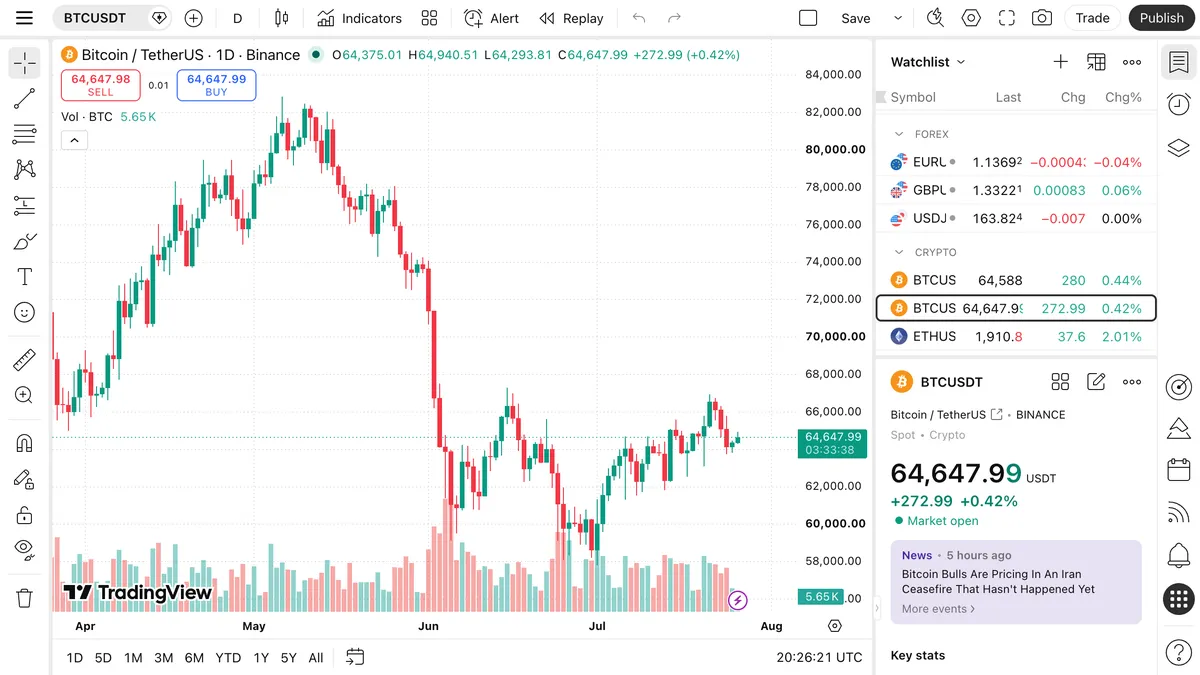
TradingView is the default among crypto analysis tools for a reason, and the free plan is enough for most people for a long time. You get real-time charts across virtually every exchange, hundreds of built-in indicators, and drawing tools that sync across devices.
The free tier limits you to two indicators per chart and one saved layout, with ads. Paid plans start around 15 USD a month and raise the indicator count, add more charts per tab and remove the ads. The upgrade is worth it when you find yourself constantly swapping indicators in and out, and not before.
The feature most beginners miss is the alert. Setting a price or indicator alert and walking away is the single biggest improvement to most people's trading, because it removes the screen-watching that leads to unplanned entries. Alerts are limited on free plans, which is the most common honest reason to upgrade.
Most exchanges embed TradingView charts directly in their own interface, so you can often do the analysis without leaving the platform you trade on. Worth checking before paying for anything.
2. Market data: CoinGecko and CoinMarketCap
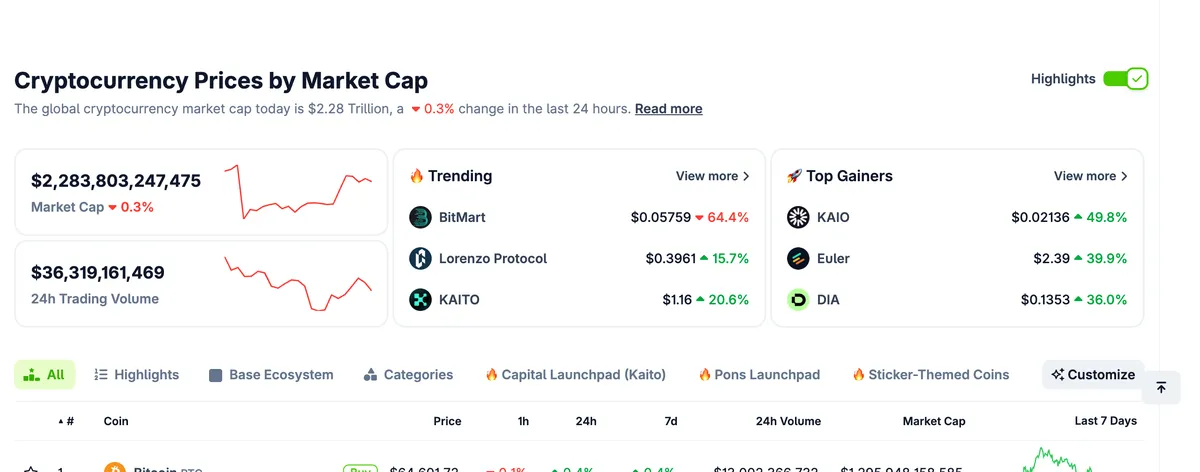
Both are free, both do the same core job, and the difference between them matters less than people argue. Prices, market caps, volumes, supply figures, exchange listings and historical data across thousands of assets.
Where they earn their place is in the details around the number. Which exchanges actually list a token and with what volume, whether that volume is concentrated on one venue, when the token unlocks, how the supply schedule works. That context is what separates a real position from a screenshot of a green candle.
A practical habit: before buying anything outside the top 50, check the exchange list and the volume distribution. A token with impressive volume on one obscure venue and nothing anywhere else is a liquidity problem waiting to become your problem when you try to exit.
3. Portfolio tracking: CoinStats, Delta and the spreadsheet
The moment you hold assets in more than one place, you stop knowing what you actually own. A tracker connects to exchanges through read-only API keys and to wallets through public addresses, then shows one number instead of six.
CoinStats and Delta both have usable free tiers and paid plans in the 10 to 15 USD a month range that raise connection limits and add analytics. For most people the free tier is sufficient, and the paid one is worth it only if the connection limit is genuinely blocking you.
One security point that is worth more than the tool choice: when you connect an exchange, create an API key with read permission only, never with trading or withdrawal rights. A tracker has no reason to place orders, and a key that cannot trade cannot be abused if the service is compromised.
The unfashionable alternative still works. A spreadsheet updated weekly gives you the same number, costs nothing, connects to nothing, and forces you to look at each position individually, which is not the worst habit to build.
4. On-chain analytics: Glassnode, Nansen, Dune
This is the category where free genuinely stops being enough, and the only group of cryptocurrency tools here where the subscriptions get expensive. On-chain data shows what wallets are doing rather than what price is doing: exchange inflows and outflows, holder cohorts, realised profit, whale movements.
Glassnode and Nansen both gate their differentiated metrics behind plans that run from roughly 30 USD a month into the hundreds for professional tiers. The free views are genuinely useful for orientation and genuinely not the reason anyone subscribes.
Dune sits differently. It is free to browse and lets anyone query blockchain data with SQL, with thousands of public dashboards already built by other people. If you can read a query you can get a lot of what the paid platforms sell, at the cost of your own time.
Be honest about whether you will use it. On-chain analytics rewards people who build a repeatable process around two or three metrics. For anyone checking it occasionally when the market moves, it is an expensive way to confirm what the chart already showed.
5. Automation: 3Commas, Cryptohopper and the exchange's own tools
A bot executes a strategy. It does not have one. That sentence is the entire risk of this category: automating a losing approach does not fix it, it just runs it more often and with more discipline than you would have managed yourself.
Where bots earn their keep is in the mechanical work humans do badly. Grid trading in a range, dollar-cost averaging on a schedule, taking profit at levels you set while calm rather than while watching. Plans typically run 20 to 100 USD a month depending on how many bots and exchanges you connect.
Before paying for a third-party service, check what your exchange already gives you. Most major venues now include grid bots, DCA bots and trailing orders in the interface at no extra cost, and they run on the exchange's own infrastructure rather than through an API key you had to hand to someone else.
Automation also multiplies your fees, which is the part the marketing never mentions. A grid bot that opens forty positions a day pays forty times the fee, and that cost comes out of the same edge the bot was built to capture. Run the arithmetic on your fee rate before you run the bot.
6. Tax and record keeping: Koinly, CoinTracker
This is the tool people skip and then regret, usually in the last week before a filing deadline. Tax software imports transactions from exchanges and wallets, matches buys to sells, and produces a report in the format your jurisdiction expects.
Both Koinly and CoinTracker let you import and view your data for free and charge only when you generate the actual tax report, typically 50 to 200 USD a year depending on transaction count. That pricing model is more generous than it looks, because you can see whether the import worked before paying anything.
The reason to set it up early is not the report. It is that exchanges do not keep your history forever, and an exchange that closes takes its export function with it. Anyone who traded on a venue that has since wound down knows this problem, and the two shutdowns of the past month have created a fresh batch of people learning it the hard way.
Rules differ enormously by country and this is not tax advice. What travels everywhere is the principle: export your trade history regularly and keep it somewhere that is not the exchange.
7. The tool nobody lists: what you pay to trade
Add up every subscription in this article and an enthusiastic trader might spend 100 USD a month. A trader moving 5 million USDT a month in taker orders pays roughly 4,000 USD a month in trading fees. One of those numbers is worth optimising, and it is not the one anyone writes round-ups about.
The lever has three parts. Maker orders instead of taker orders, where the gap between roughly 0.02% and 0.06% compounds over every trade you place. VIP tiers, which most exchanges award on 30-day volume and which many active traders qualify for without noticing. And rebates, where a share of the fee comes back to you.
That last part is what we do, so treat this paragraph with the scepticism it deserves and check the arithmetic yourself. Trade Reclaim returns 30% to 50% of the trading fees you pay across 9 exchanges, in USDT. Our cashback calculator takes your monthly volume and shows the number per exchange, and it is free whether or not you sign up for anything.
The reason this belongs in a tools article is not the product. It is that traders will spend an afternoon comparing two charting subscriptions that differ by 5 USD a month while paying a fee rate they have never once looked up. The cost side is the least glamorous part of trading and the most reliable place to find money.
What each one costs, side by side
Prices move and tiers get renamed, so treat this as the shape of the market rather than a quote. The pattern that matters is which categories have a genuinely usable free tier and which do not.
| Category | Common choices | Free tier | Typical paid |
|---|---|---|---|
| Charting | TradingView | Yes, 2 indicators | ~15 USD/mo |
| Market data | CoinGecko, CoinMarketCap | Yes, full | Not needed |
| Portfolio | CoinStats, Delta | Yes, limited connections | 10 to 15 USD/mo |
| On-chain | Glassnode, Nansen, Dune | Dune yes, others limited | 30 USD/mo and up |
| Automation | 3Commas, Cryptohopper, exchange bots | Exchange bots often free | 20 to 100 USD/mo |
| Tax | Koinly, CoinTracker | Import free, report paid | 50 to 200 USD/yr |
| Fee reduction | VIP tiers, maker orders, rebates | Yes | None |
How to pick, and what people get wrong
Start with the job, not the tool. Write down the specific thing you cannot currently do: I cannot see all my positions in one place, I keep missing entries because I am not watching, I have no idea what I owe in tax. Then pick the cheapest thing that solves it and use it for a month before adding another.
The most common mistake is stacking subscriptions that overlap. A charting plan, a portfolio tracker with charting built in, and a bot platform with its own charts is three payments for one job. Audit what you already have before adding to it, including whatever your exchange includes for free.
The second mistake is confusing information with edge. More indicators, more dashboards and more data feeds feel like progress and mostly produce hesitation. Traders who do well tend to look at fewer things more carefully, and the tool that gets used every day beats the one with the longer feature list.
The third is granting more access than a tool needs. Read-only API keys for trackers, no withdrawal permission for anything, and a hard look at any service asking for more. A tool that cannot move your money cannot lose it for you.
The best tools for trading cryptocurrency, for most people
For the majority, the best crypto tools are the boring ones: TradingView on the free plan, CoinGecko or CoinMarketCap for data, one portfolio tracker with read-only keys, and tax software set up before you need it. Total cost, zero to about 15 USD a month, and it covers the work.
Add on-chain analytics when you have a specific repeatable question it answers, not before. Add automation when you have a strategy that works manually and is boring you, not as a substitute for having one. Both are worth it for the right person and expensive for everyone else.
Then look at the fee rate you are paying, because it is almost certainly the largest line item in your trading and the one you have spent the least time on.
Start with the number you have never looked up
Enter your monthly volume and see what you are paying in trading fees across 9 exchanges, and how much of it comes back with cashback. It takes a minute, costs nothing, and for most active traders it is the largest number in this article.
Frequently asked questions
What are crypto trading tools?
Software that supports a specific part of trading rather than trading for you. The main categories are charting and technical analysis, market data, portfolio tracking, on-chain analytics, automation, tax reporting, and cost control. Most traders need four of the seven, and several have free tiers that cover the job completely.
What are the best free crypto trading tools?
TradingView's free plan for charting, CoinGecko or CoinMarketCap for market data, and Dune for on-chain queries if you can read SQL. Most exchanges also include grid and DCA bots at no extra cost, which removes the main reason to pay for a third-party automation service.
Do I need a paid TradingView subscription?
Not at first. The free plan gives real-time charts and hundreds of indicators, limited to two indicators per chart and one saved layout. The honest reasons to upgrade are alerts and indicator count. If you are constantly swapping indicators or missing entries because you cannot set enough alerts, the roughly 15 USD a month pays for itself.
Are crypto trading bots worth it?
Only if you already have a strategy that works when you run it manually. A bot executes rules, it does not create an edge, and automating a losing approach simply loses money more consistently. Bots earn their cost on mechanical, repetitive work such as grid trading or scheduled buying, and they multiply your trading fees along with your trade count.
Which cryptocurrency analysis tool should a beginner start with?
TradingView, on the free plan. Charting is the one category you cannot skip, the free tier is genuinely sufficient, and most exchanges embed TradingView charts in their own interface so you can start without creating another account. Add market data second and a portfolio tracker once you hold assets in more than one place.
Is it safe to connect a portfolio tracker to my exchange account?
It is, provided you create the API key with read permission only and no trading or withdrawal rights. A tracker has no reason to place orders or move funds. If a service asks for permissions beyond reading balances and history, that is a reason to look at a different service rather than to grant them.
How much should a trader spend on tools per month?
Most people need zero to about 15 USD a month: a free charting plan, free market data, and a tracker. On-chain analytics and automation are the categories that push it higher, and both are worth paying for only once you have a specific repeatable use for them.
What is the most overlooked crypto trading tool?
Fee reduction. Subscriptions cost an enthusiastic trader perhaps 100 USD a month, while someone moving 5 million USDT a month in taker orders pays around 4,000 USD a month in trading fees. Maker orders, VIP tiers and rebate programs all reduce that number, and almost no tool round-up mentions any of them.
Do I need crypto tax software if I only made a few trades?
Probably not for the report itself, but set up the import anyway. Exchanges do not keep your history indefinitely, and one that shuts down takes its export with it. Both Koinly and CoinTracker let you import and view data for free and only charge when you generate a report, so there is no cost to keeping your records current.
Trade Reclaim Research tracks trading fees, VIP schedules and rebate programs across 9 crypto exchanges, and spends more time in these tools than is strictly healthy.
Trade Reclaim earns from exchange referrals and shares most of it back to you as cashback. Education, not financial advice.